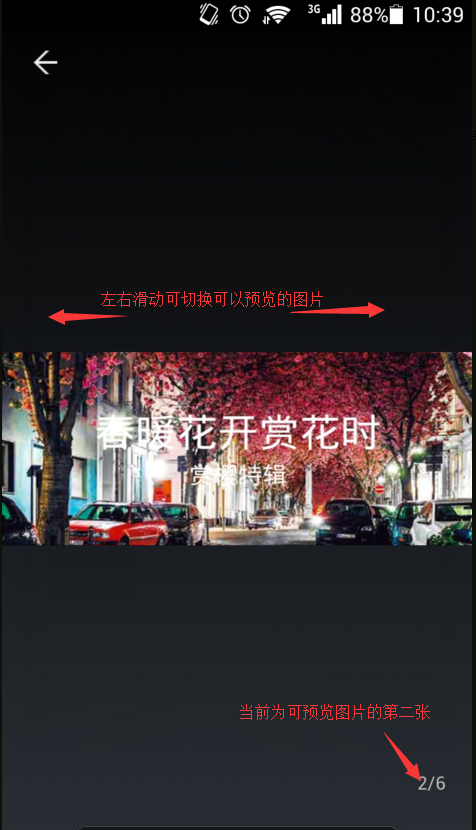
开启app的图片预览功能值,可以设置某些图片的预览功能。
1. 在需要调用JS接口的页面引入如下JS文件,(支持https):http://static.ydbimg.com/API/YdbOnline.js
2. 初始化方法:var YDB = new YDBOBJ(); //初始化之后才可以调用相应SDK方法。
3.在需要图片预览功能的页面里添加 YDB.ImageViewState(state);
  //参数说明:如果要开启图片预览功能,需要在相应页面调用此功能,当state设置为0时关闭图片预览功能;当state设置为1时,开启图片预览功能,
  //同时,页面中在需要预览功能支持的图片超链接进行如下设置:
  //需要在图片外层img标签增加属性Is9VImg="true",当Is9vImg值为true时,点击图片会启动App的图片浏览器。
4.示例:
页面添加调用方法
1 2 3 4 5 6 7 8 9 | <script src="http://static.ydbimg.com/Scripts/jquery-1.9.1.js" type="text/javascript"></script> <script src="http://static.ydbimg.com/API/YdbOnline.js" type="text/javascript"></script> <script type="text/javascript"> var YDB = new YDBOBJ(); $(function () { /*开启图片预览功能*/ YDB.ImageViewState(1); }); </script> |
1 2 3 4 5 6 | <div class="lxrc_san"> <img src="images/lxrc_yi.png" Is9VImg="true"> </div><div class="lxrc_san"> <img src="images/lxrc_er.png" Is9VImg="true"> </div><div class="lxrc_san"> <img src="images/lxrc_san.png" Is9VImg="true"> </div><div class="lxrc_san"> <img src="images/lxrc_yi.png" Is9VImg="true"> </div><div class="lxrc_san"> <img src="images/lxrc_er.png" Is9VImg="true"> </div><div class="lxrc_san"> <img src="images/lxrc_san.png" Is9VImg="true"> </div> |
手机效果:
详细方法可参考:http://www.yundabao.cn/API/YdbOnline.aspx#YdbOnline.4.10