表格展示
## minTable
### 1. 功能
数据表格展示
### 2. 使用场景
需要展示表格的需求

### 3. 如何使用
**myTable = onion.minTable(options)**
`options` 为传入的自定义参数
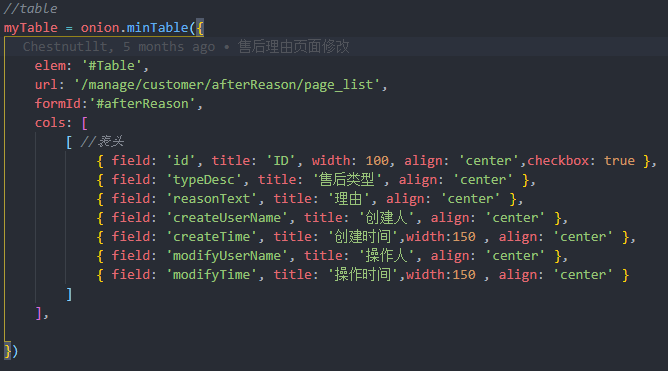
```js
myTable = onion.minTable({
elem: '#Table', // 表格名
url: '/manage/' + url, // 获取表格数据的接口
formId: '#fileForm', // 查询表格的表单
where: {
id: id // 传参
},
cols: [ // 注意 cols 中是 [[]] , 少写会报错
[ //表头
]
],
})
```
#### 3.1 内容设置
**写在 `cols:[[]]` 内**
##### 3.1.1 选择框
```javascript
{
field: '',
width: 60,
align: "center",
checkbox: true
}
```
==获得选中行的数据, Table 为实际表名==
```js
var selectedData = onion.selectedByTable("Table")
```
##### 3.1.2 普通字段
对应每一行, 没有width会自适应, 也可设置 `minWidth`
```javascript
{
field: 'id',
title: 'ID',
width: 100,
align: 'center'
}
```
##### 3.1.3 表格操作
对应表格功能按键, 见下文
```javascript
{
field: "",
title: "操作",
align: "center",
width: 200,
toolbar: "#operation"
}
```
##### 3.1.4 类型判断
根据后台返回的数据判断
```javascript
{
field: "type",
title: "类型",
align: "center",
templet: function (d) {
if (d.type === 1) {
return '类型一'
} else if (d.type === 2) {
return '类型二'
} else if (d.type === 3) {
return '类型三'
} else {
return '未知'
}
}
```
##### 3.1.5 图片显示
后台会返回图片地址
```javascript
{
field: "img",
title: "图片",
align: "center",
templet: function (d) {
return (
'<img src="http://img.51msyc.com/' +
d.imgUrl + '">'
);
}
}
```
#### 3.2 参数查询
```js
// 默认参数, 可覆盖
myTable = onion.minTable({
elem: '#userTable',
url: '/manage/system/user/page_list',
height: 400,
method: 'post',
contentType: 'application/json',
response: {
statusCode: 10000 //重新规定成功的状态码为 200,table 组件默认为 0
},
limits: [10, 20, 30, 40, 50, 60, 70, 80, 90, 100, 150, 200],
cols: [
[ //表头
{
field: 'userId',
title: '用户ID',
width: 250,
align: 'center'
},
{
field: 'userCode',
title: '登录名称',
align: 'center'
},
{
field: 'userName',
title: '用户名称',
templet: '#statusTpl',
align: 'center'
},
{
field: '',
title: '操作',
width: 300,
align: 'center',
toolbar: '#operation'
},
]
],
page: {
limit: 20
}, //开启分页
parseData: function (res) {
onion.log.setLog(options.url || '', res)
if (res.code == networkCode.NOTAUTH) {
onion.leave();
return;
}
try {
var data1 = res.data.list;
var data2 = res.data;
var data3 = res.data.records;
var result;
if (data1 != null) {
result = data1;
} else {
if (data3 != null) {
result = data3;
} else {
if (data2 != null) {
result = data2;
}
}
}
} catch (e) {
return {
"code": '40000', //接口状态
"msg": '接口异常', //提示文本
"count": 0, //数据长度
"data": {
totalCount: 0,
limit: 20,
totalPage: 0,
page: 1,
list: []
} //数据列表
}
}
return {
"code": res.code, //接口状态
"msg": res.msg, //提示文本
"count": res.data.totalCount, //数据长度
"data": result //数据列表
}
},
done: function () {
onion.getPermission();
}
})
```
### 4. api定义
``` javascript
onion.minTable = function (options) {
onion.getPermission();
var defaultOpts = {
elem: '#userTable',
url: '/manage/system/user/page_list',
height: 400,
method: 'post',
contentType: 'application/json',
response: {
statusCode: 10000 //重新规定成功的状态码为 200,table 组件默认为 0
},
limits: [10, 20, 30, 40, 50, 60, 70, 80, 90, 100, 150, 200],
cols: [
[ //表头
{
field: 'userId',
title: '用户ID',
width: 250,
align: 'center'
},
{
field: 'userCode',
title: '登录名称',
align: 'center'
},
{
field: 'userName',
title: '用户名称',
templet: '#statusTpl',
align: 'center'
},
{
field: '',
title: '操作',
width: 300,
align: 'center',
toolbar: '#operation'
},
]
],
page: {
limit: 20
}, //开启分页
parseData: function (res) {
onion.log.setLog(options.url || '', res)
if (res.code == networkCode.NOTAUTH) {
onion.leave();
return;
}
try {
var data1 = res.data.list;
var data2 = res.data;
var data3 = res.data.records;
var result;
if (data1 != null) {
result = data1;
} else {
if (data3 != null) {
result = data3;
} else {
if (data2 != null) {
result = data2;
}
}
}
} catch (e) {
return {
"code": '40000', //接口状态
"msg": '接口异常', //提示文本
"count": 0, //数据长度
"data": {
totalCount: 0,
limit: 20,
totalPage: 0,
page: 1,
list: []
} //数据列表
}
}
return {
"code": res.code, //接口状态
"msg": res.msg, //提示文本
"count": res.data.totalCount, //数据长度
"data": result //数据列表
}
},
done: function () {
onion.getPermission();
}
};
var currentOpts = $.extend({}, defaultOpts, options);
if (currentOpts.formId) {
currentOpts['height'] = 'full-' + onion.otherHeight(currentOpts.formId);
}
return myTable.render(currentOpts);
};
```