做业务界面之前,先完成文档中 组件-->文本框组件 的开发,如果已完成,请忽略
界面命名规范:/src/pages/user/userinfo.vue
样式文件: /src/static/system_01/style/user/userinfo.scss
新增用户界面一行显示一个项。排版布局如下图,只是布局用这种,文本框样式用element-ui自带的,与整套系统的样式搭配:
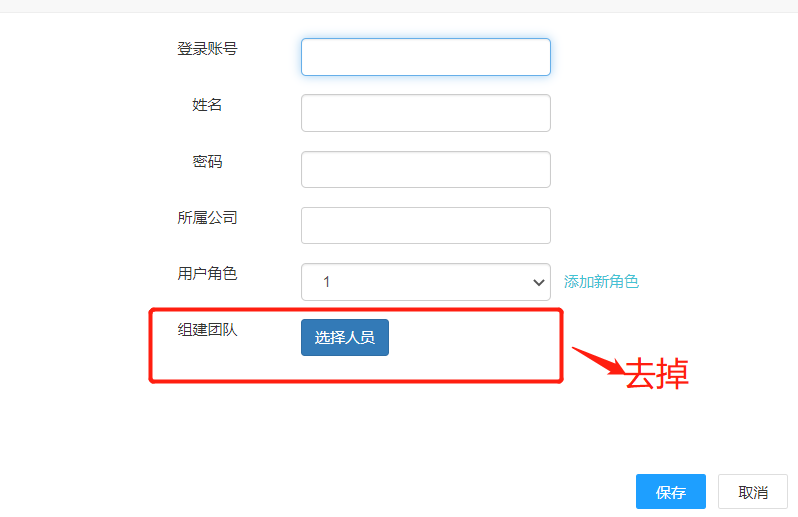
上图界面中的每个输入项都是根据接口返回的数据生成的。 具体数据如下:
1、字段说明:
colname--字段名称,此字段的值与业务数据的字段名一致。可用于设置为控件的唯一标识
showname--label标签名
isnull--字段是否允许为空
controltype--输入项控件类型 ( text--单行文本框 password--密码框 textarea--多行(文本域) select--为下拉选项(可搜索的) selecttext---可输可选的下拉框。 switch--开关)
coltype--文本框内容类型,即文本框组件中的coltype。
coltdwidth--控件宽度,纯数字的
colindex--控件生成顺序。
coldefault --文本框内显示的默认值
colformat--文本框格式化方式
linkcol--关联显示的控件。
linkvalue--关联控件显示的触发值, 当linkcol有配置时,当前控件的值等于linkvalue的值,就显示linkcol中配置的控件。
colsource --select、selecttext下拉选项的数据源
groupcoltrol--组合控件,当控件是组合控件时,此参数有值。如上图中的用户角色的输入框就是组合的,由一个文本框输入框+link文字链接组成,点击文字链接可触发单击事件。
colevent--控件的触发事件 click--单击 blur--离开事件
colfun--控件触发事件方法名,比如配置的名称为 addrole,表示点击控件时触发addrole的方法。
2、界面生成数据格式如下:
{
"columns": [{
"colname": "u_account",
"showname": "用户账号",
"isnull": false,
"controltype": "text",
"coltype": "text",
"coltdwidth": 200,
"colindex": 1,
"coldefault": "1001",
"colformat": "去特殊符号",
"linkvalue": "",
"linkcol": []
},
{
"colname": "u_name",
"showname": "用户姓名",
"isnull": false,
"controltype": "text",
"coltype": "text",
"coltdwidth": 200,
"colindex": 2,
"coldefault": "",
"colformat": "",
"linkvalue": "",
"linkcol": []
},
{
"colname": "u_password",
"showname": "登录密码",
"isnull": false,
"controltype": "password",
"coltype": "text",
"coltdwidth": 200,
"colindex": 3,
"coldefault": "",
"colformat": "",
"linkvalue": "",
"linkcol": []
},
{
"colname": "u_company",
"showname": "所属公司",
"isnull": false,
"controltype": "text",
"coltype": "text",
"coltdwidth": 200,
"colindex": 4,
"coldefault": "",
"colformat": "",
"linkvalue": "",
"linkcol": []
},
{
"colname": "r_name",
"showname": "用户角色",
"isnull": false,
"controltype": "text",
"coltype": "text",
"coltdwidth": 200,
"colindex": 5,
"coldefault": "",
"colformat": "",
"linkvalue": "",
"linkcol": [],
"colsource": [{
"text": "管理员",
"value": "1"
},
{
"text": "门店管理员",
"value": "2"
}
],
"groupcoltrol": [{
"colname": "",
"showname": "添加新角色",
"isnull": false,
"controltype": "link",
"coltype": "",
"coltdwidth": 0,
"colindex": 1,
"coldefault": "",
"colformat": "",
"colevent": "click",
"colfun": "addrole",
"linkvalue": "",
"linkcol": []
}]
}
]
}
3、业务数据格式如下:
{
"data": {
"u_account": "8888",
"u_name": "张三",
"u_password": "",
"r_name": "管理员",
"u_company": "云帮"
}
}