界面命名规范:/src/pages/packagemanage/createorder.vue
样式文件: /src/static/system_01/style/createorder.scss
界面布局排版如下,颜色以及字体搭配按整个系统的基调来。
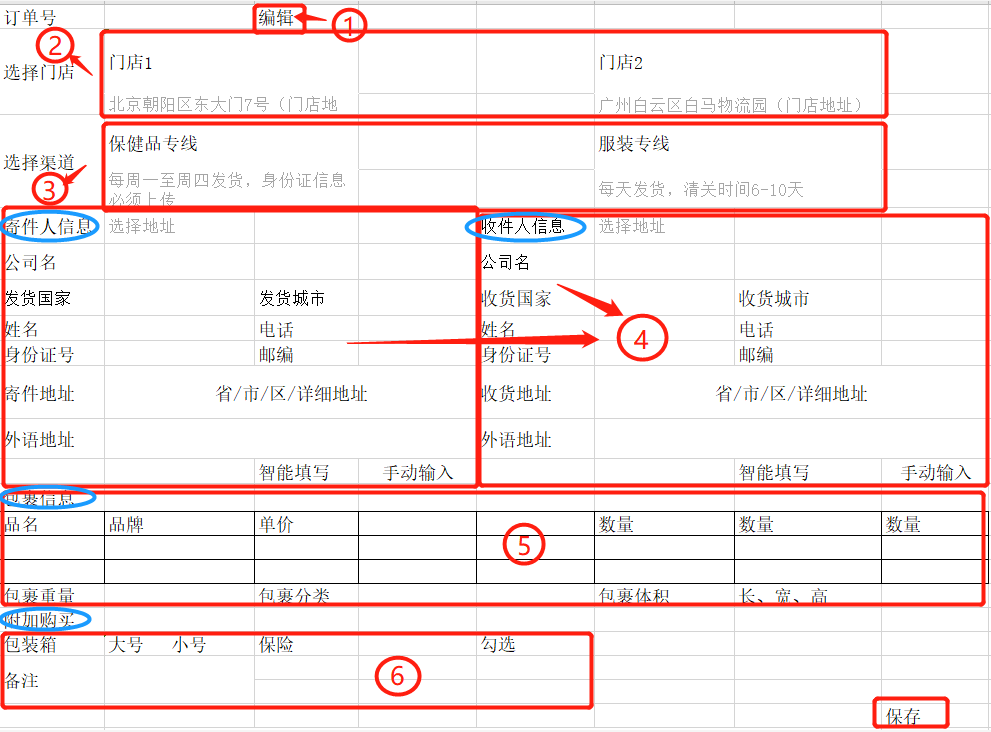
上图中标三个圈的是标题,可用小图标+标题名称的方式展示;每个红色大框框住的是各个版块信息。
在线下单的整体布局json数据:
l_mode --表示布局板块名称,标签可按此名称生成
ishidden--是否隐藏 False-不隐藏(即显示) True--隐藏
isfixed--是否为固定布局 False--框内数据动态排版 True--框内信息固定排版
[{
"l_mode": "订单号",
"isfixed": "False",
"ishidden": "False"
}, {
"l_mode": "选择门店",
"isfixed": "False",
"ishidden": "False"
}, {
"l_mode": "选择渠道",
"isfixed": "False",
"ishidden": "False"
}, {
"l_mode": "寄件人信息",
"isfixed": "True",
"ishidden": "False"
}, {
"l_mode": "收件人信息",
"isfixed": "True",
"ishidden": "False"
}, {
"l_mode": "包裹信息",
"isfixed": "True",
"ishidden": "False"
}, {
"l_mode": "附加购买",
"isfixed": "True",
"ishidden": "False"
}]
1、加载时订单号文本框默认是不可编辑的,点击后面的编辑按钮时文本框才会变为可编辑状态。
2、选择门店的生成,门店信息内容有:
shopname--门店名称,字体加粗 加大。
shopremark--门店简介,字体浅色,比当前页面字体小一号
{
"shop": [{
"shopname": "北京总店",
"shopremark": "该店位于北京市朝阳区,主要接收各种母婴类代购商品"
},
{
"shopname": "广州总店",
"shopremark": "该店位于广州天河区,主要接收各类潮牌服饰"
}
]
}
门店信息的样式可参考下图

3、选择渠道,样式可直接参考门店样式。
渠道信息如下:
p_mode --渠道名称
remark --渠道备注
{
"clearance": [{
"p_mode": "服装专线",
"remark": "每周一至周四收货,周五清关。身份证必须上传"
},
{
"p_mode": "母婴专线",
"remark": "每周一至周四收货,周五清关。身份证必须上传"
}
]
}
4、收寄件人信息,这两个模块的内容是根据配置生成。
相当于是有个固定框框,可设置一排显示几个输入项
而输入项是根据后台配置的项显示,比如配置的是姓名文本框,公司名文本框、国家选择框,那么界面上就两个文本框和一个下拉选项。
这种输出方式其他界面中会经常用到,需要通用型的展示方式,别的界面可以直接配置输出行数和输出内容就可以。
框内的动态数据格式如下,数据包含寄件人信息、收件人信息、包裹信息、附加购买信息的输入项数据:
1、字段说明:
colname--字段名称,此字段的值与业务数据的字段名一致。可用于设置为控件的唯一标识
showname--label标签名
isnull--字段是否允许为空
controltype--输入项控件类型 ( text--单行文本框 password--密码框 textarea--多行(文本域),当控件类型为textarea时,默认占一行; select--为下拉选项(可搜索的) selecttext---可输可选的下拉框。 switch--开关)
coltype--文本框内容类型,即文本框组件中的coltype。text--表示任意文本输入,无任何验证的; idcard--验证输入内容是否为规范的身份证号码,float--仅可以输入数字 english--仅可以输入英文 焦点离开文本框时就验证。
coltdwidth--控件宽度,纯数字的
colindex--控件生成顺序。
coldefault --文本框内显示的默认值
colformat--文本框格式化方式
linkcol--关联显示的控件。
linkvalue--关联控件显示的触发值, 当linkcol有配置时,当前控件的值等于linkvalue的值,就显示linkcol中配置的控件。
colsource --select、selecttext下拉选项的数据源
groupcoltrol--组合控件,当控件是组合控件时,此参数有值。如上图中的用户角色的输入框就是组合的,由一个文本框输入框+link文字链接组成,点击文字链接可触发单击事件。
colevent--控件的触发事件 click--单击 blur--离开事件
colfun--控件触发事件方法名,比如配置的名称为 addrole,表示点击控件时触发addrole的方法。
寄件人输出项json数据格式
[{
"l_mode": "寄件人信息",
"showname": "公司名",
"isnull": "False",
"ishidden": "False",
"controltype": "text",
"coltype": "text",
"colsource": "",
"colevent": "",
"colfun": "",
"coltdwidth": "80",
"coldefault": "",
"colname": "ctcompany"
},
{
"l_mode": "寄件人信息",
"showname": "发货国家",
"isnull": "False",
"ishidden": "False",
"controltype": "select",
"coltype": "text",
"colsource": [{
"title": "美国",
"value": "US"
}, {
"title": "中国",
"value": "CN"
}],
"colevent": "",
"colfun": "",
"coltdwidth": "80",
"coldefault": "",
"colname": "ctcountry"
},
{
"l_mode": "寄件人信息",
"showname": "发货城市",
"isnull": "False",
"ishidden": "False",
"controltype": "text",
"coltype": "text",
"colsource": "",
"colevent": "",
"colfun": "",
"colindex": "3",
"coltdwidth": "80",
"coldefault": "",
"colname": "ctcity"
},
{
"l_mode": "寄件人信息",
"showname": "姓名",
"isnull": "False",
"ishidden": "False",
"controltype": "text",
"coltype": "text",
"colsource": "",
"colevent": "",
"colfun": "",
"colindex": "4",
"coltdwidth": "80",
"coldefault": "",
"colname": "ctname"
},
{
"l_mode": "寄件人信息",
"showname": "电话",
"isnull": "False",
"ishidden": "False",
"controltype": "text",
"coltype": "text",
"colsource": "",
"colevent": "",
"colfun": "",
"colindex": "5",
"coltdwidth": "80",
"coldefault": "",
"colname": "ctphone"
},
{
"l_mode": "寄件人信息",
"showname": "身份证号",
"isnull": "False",
"ishidden": "False",
"controltype": "text",
"coltype": "idcard",
"colsource": "",
"colevent": "",
"colfun": "",
"colindex": "6",
"coltdwidth": "80",
"coldefault": "",
"colname": "ctidcard"
},
{
"l_mode": "寄件人信息",
"showname": "邮编",
"isnull": "False",
"ishidden": "False",
"controltype": "text",
"coltype": "text",
"colsource": "",
"colevent": "",
"colfun": "",
"colindex": "7",
"coltdwidth": "80",
"coldefault": "",
"colname": "ctpostcode"
},
{
"l_mode": "寄件人信息",
"showname": "寄件地址",
"isnull": "False",
"ishidden": "False",
"controltype": "textarea",
"coltype": "text",
"colsource": "",
"colevent": "",
"colfun": "",
"colindex": "8",
"coltdwidth": "200",
"coldefault": "",
"colname": "ctaddressall"
},
{
"l_mode": "寄件人信息",
"showname": "外语地址",
"isnull": "False",
"ishidden": "False",
"controltype": "textarea",
"coltype": "text",
"colsource": "",
"colevent": "",
"colfun": "",
"colindex": "9",
"coltdwidth": "200",
"coldefault": "",
"colname": "ctaddressall_f"
}
]
寄件人信息输出值json
{
"ctcompany": "广州市云帮软件科技有限公司",
"ctcontry": "US",
"ctcity": "New York",
"ctname": "张三",
"ctphone": "13266598547",
"ctidcard": "4456925514558758",
"ctpostcode": "41254",
"ctaddressall": "New wrsewte 1032 42342",
"ctaddressall_f": "New wrsewte 1032 42342"
}
[{
"l_mode": "附加信息",
"showname": "包装箱",
"isnull": "False",
"ishidden": "False",
"controltype": "select",
"coltype": "text",
"colsource": "",
"colevent": "",
"colfun": "",
"colindex": "5",
"coltdwidth": "80",
"coldefault": ""
}, {
"l_mode": "附加信息",
"showname": "购买保险",
"isnull": "False",
"ishidden": "False",
"controltype": "checkbox",
"coltype": "text",
"colsource": "",
"colevent": "",
"colfun": "",
"colindex": "6",
"coltdwidth": "80",
"coldefault": ""
}, {
"l_mode": "附加信息",
"showname": "备注",
"isnull": "False",
"ishidden": "False",
"controltype": "textarea",
"coltype": "text",
"colsource": "",
"colevent": "",
"colfun": "",
"colindex": "7",
"coltdwidth": "80",
"coldefault": ""
}
]
5、包裹信息也是动态生成。包裹信息分类两个部分:
a、包裹列表,列表的表头和表体也是动态生成的,最后一列操作列是固定的,用来做删除行。列表下的两个操作按钮【新增行】、【从商品库中选择】,这两个按钮跟随列表显示,即当包裹信息中配置了需要显示商品列表时,这两个按钮就显示,如果列表不显示时,两个操作按钮则不显示。
【新增行】:点击时,列表添加一行
【从商品库中选择】:点击时,弹出商品列表选择窗口,选择之后回填到此页面的包裹列表中
b、包裹其他信息,包括包裹重量,包裹分类,包裹体积,这些是根据配置来显示的,比如只配置了包裹重量,那么这里就只会显示包裹重量的输入项,其他两个不显示。
具体细节布局排版如下图:

包裹信息格式json
controltype ---当为table时,输出的是可编辑的列表 ,当前Ojbect下会有table属性; cascader -- 为多级联动选择器 ; combox-input--组合文本框,当前Ojbect 会有combox-input 属性
[{
"l_mode": "包裹信息",
"showname": "",
"isnull": "False",
"ishidden": "False",
"controltype": "table",
"coltype": "table",
"colsource": "",
"colevent": "",
"colfun": "",
"colindex": "1",
"coltdwidth": "100",
"coldefault": "",
"table": [{
"showname": "商品条码",
"isnull": "False",
"ishidden": "False",
"controltype": "input",
"coltype": "text",
"colsource": "",
"colevent": "",
"colfun": "",
"colindex": "1",
"coltdwidth": "100",
"coldefault": "",
"colname": "barcode"
}, {
"showname": "数量",
"isnull": "False",
"ishidden": "False",
"controltype": "input",
"coltype": "float",
"colsource": "",
"colevent": "",
"colfun": "",
"colindex": "1",
"coltdwidth": "100",
"coldefault": "",
"colname": "num"
}]
}, {
"l_mode": "包裹信息",
"showname": "包裹分类",
"isnull": "False",
"ishidden": "False",
"controltype": "cascader",
"coltype": "text",
"colsource": "",
"colevent": "",
"colfun": "",
"colindex": "2",
"coltdwidth": "80",
"coldefault": "",
"colname": "p_bagsort"
}, {
"l_mode": "包裹信息",
"showname": "包裹重量",
"isnull": "False",
"ishidden": "False",
"controltype": "text",
"coltype": "float",
"colsource": "",
"colevent": "",
"colfun": "",
"colindex": "3",
"coltdwidth": "80",
"coldefault": "",
"colname": "grossweight"
}, {
"l_mode": "包裹信息",
"showname": "包裹体积",
"isnull": "False",
"ishidden": "False",
"controltype": "combox-input",
"coltype": "float",
"colsource": "",
"colevent": "",
"colfun": "",
"colindex": "4",
"coltdwidth": "80",
"coldefault": "",
"combox-input": [{
"showname": "长",
"isnull": "False",
"ishidden": "False",
"controltype": "text",
"coltype": "float",
"colsource": "",
"colevent": "",
"colfun": "",
"colindex": "3",
"coltdwidth": "80",
"coldefault": "",
"colname": "p_length"
},
{
"showname": "宽",
"isnull": "False",
"ishidden": "False",
"controltype": "text",
"coltype": "float",
"colsource": "",
"colevent": "",
"colfun": "",
"colindex": "3",
"coltdwidth": "80",
"coldefault": "",
"colname": "p_width"
}, {
"showname": "高",
"isnull": "False",
"ishidden": "False",
"controltype": "text",
"coltype": "float",
"colsource": "",
"colevent": "",
"colfun": "",
"colindex": "3",
"coltdwidth": "80",
"coldefault": "",
"colname": "p_height"
}
]
}]
6、附加信息也是动态生成,显示逻辑跟前面的是一样的。
7、保存按钮,根据参数配置来判断在线下单是否有多个步骤,如果有多个步骤的话,此处的保存按钮变为下一步,点击时跳转到指定的步骤页面;如果没有的话,则直接保存订单。
下一步的操作页面暂定为下图内容:
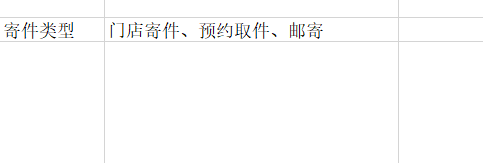
寄件类型为下拉选项。三种不同的类型对应不同的显示状态。
门店寄件:界面不变。
预约取件:界面显示取件地址、取件电话、取件联系人、指定上门时间, 来前电话(勾选框)
邮寄:显示门店的收货信息,并且显示选择快递公司(下拉选项),快递单号的录入框。