做业务界面之前,先完成文档中 组件-->文本框组件 的开发,如果已完成,请忽略
界面命名规范:/src/pages/user/group.vue
样式文件: /src/static/system_01/style/user/group.scss
组织结构界面一行输出两个控件,当输入项控件类型为 textarea时,则占一行。排版布局如下图:
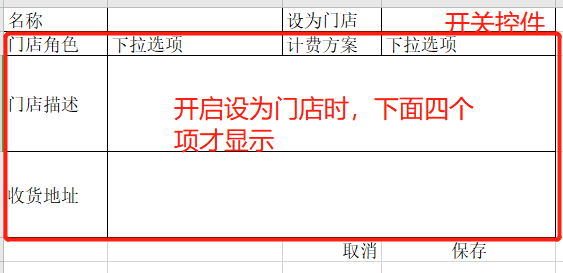
上图界面中的每个输入项都是根据接口返回的数据生成的。 具体数据如下:
1、字段说明:
colname--字段名称,此字段的值与业务数据的字段名一致。可用于设置为控件的唯一标识
showname--label标签名
isnull--字段是否允许为空
controltype--输入项控件类型 ( text--单行文本框 password--密码框 textarea--多行(文本域) select--为下拉选项(可搜索的) selecttext---可输可选的下拉框,即可以搜索选项,如果选项中没有,则直接保留输入的值。 switch--开关)
coltype--文本框内容类型,即文本框组件中的coltype。
coltdwidth--控件宽度,纯数字的
colindex--控件生成顺序。
coldefault --文本框内显示的默认值
colformat--文本框格式化方式
linkcol--关联显示的控件。
linkvalue--关联控件显示的触发值, 当linkcol有配置时,当前控件的值等于linkvalue的值,就显示linkcol中配置的控件。
colsource --select、selecttext下拉选项的数据源
2、界面生成数据格式如下:
{
"columns": [{
"colname": "groupname",
"showname": "名称",
"isnull": false,
"controltype": "text",
"coltype": "text",
"coltdwidth": 200,
"colindex": 1,
"coldefault": "默认名称",
"colformat": "去特殊符号",
"linkvalue": "",
"linkcol": []
},
{
"colname": "isshop",
"showname": "设置为门店",
"isnull": true,
"controltype": "switch",
"coltype": "",
"coltdwidth": 0,
"colindex": 2,
"coldefault": 0,
"colformat": "",
"linkvalue": "true",
"linkcol": [{
"colname": "r_name",
"showname": "门店角色",
"isnull": false,
"controltype": "select",
"coltype": "text",
"coltdwidth": 200,
"colindex": 3,
"coldefault": "",
"colformat": "",
"colsource": [{
"text": "北京分店",
"value": "12"
},
{
"text": "广州分店",
"value": "13"
}
],
"linkvalue": "",
"linkcol": []
},
{
"colname": "c_id",
"showname": "计费方案",
"isnull": false,
"controltype": "select",
"coltype": "text",
"coltdwidth": 200,
"colindex": 4,
"coldefault": "",
"colformat": "",
"colsource": [{
"text": "普通会员方案",
"value": "1"
},
{
"text": "vip会员方案",
"value": "2"
}
],
"linkvalue": "",
"linkcol": []
},
{
"colname": "address",
"showname": "门店地址",
"isnull": true,
"controltype": "textarea",
"coltype": "text",
"coltdwidth": 200,
"colindex": 5,
"coldefault": "",
"colformat": "",
"linkvalue": "",
"linkcol": []
}
]
}
]
}
3、业务数据格式如下:
{
"data":{
"groupname":"北京分店",
"isshop":true,
"r_name":"门店角色",
"c_id":"12",
"address":"北京朝阳区"
}
}